
OpenList/AList 美化通用方案:磨砂玻璃效果 + 音乐播放器完整 CSS 代码
OpenList 是热门网盘目录程序 AList 的社区分支版本,具备灵活扩展、长期维护与社区主导的特性。由于二者底层架构与前端逻辑高度同源,本套美化方案可完美兼容 OpenList 与 AList V3 全版本使用。
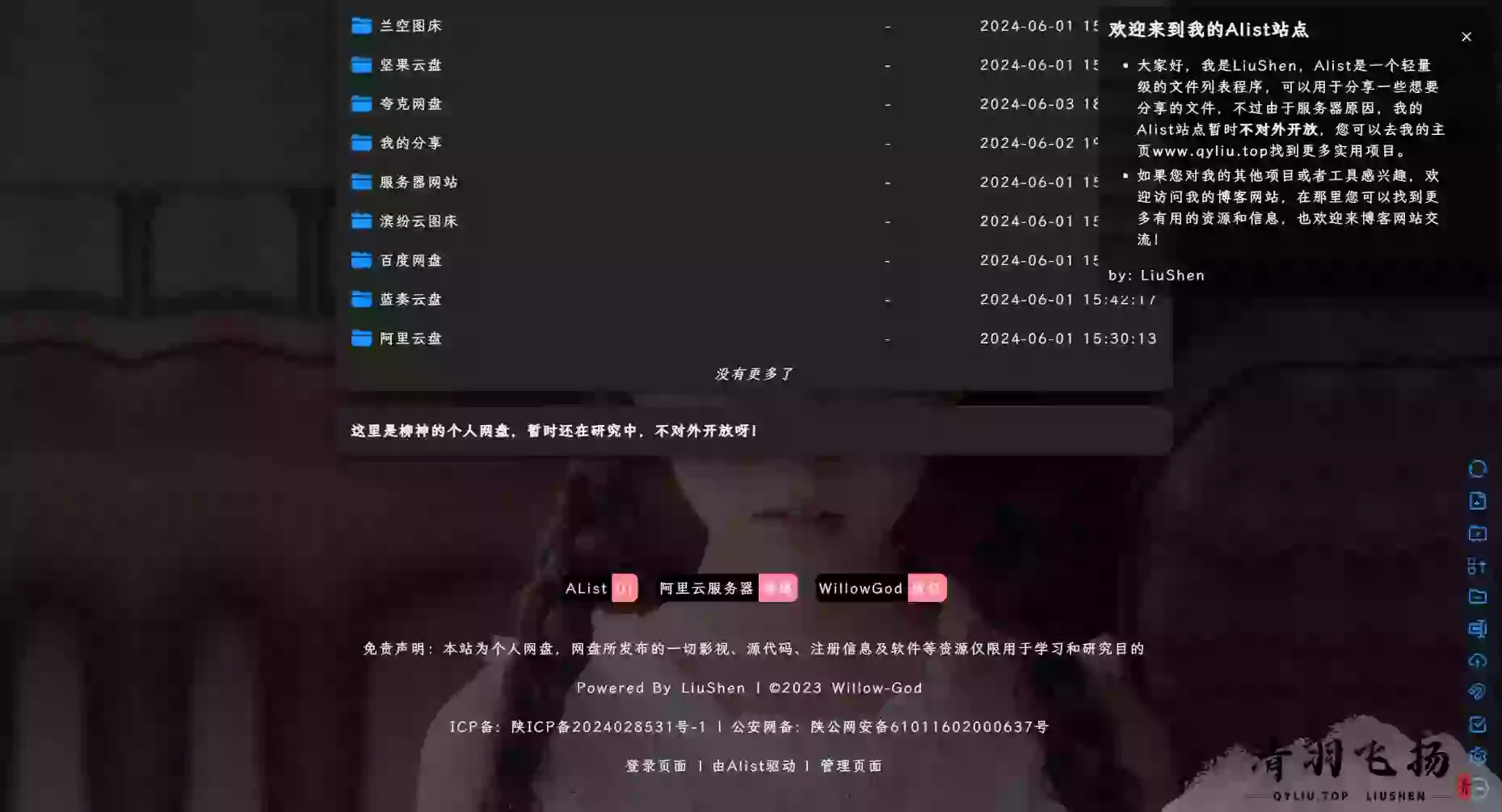
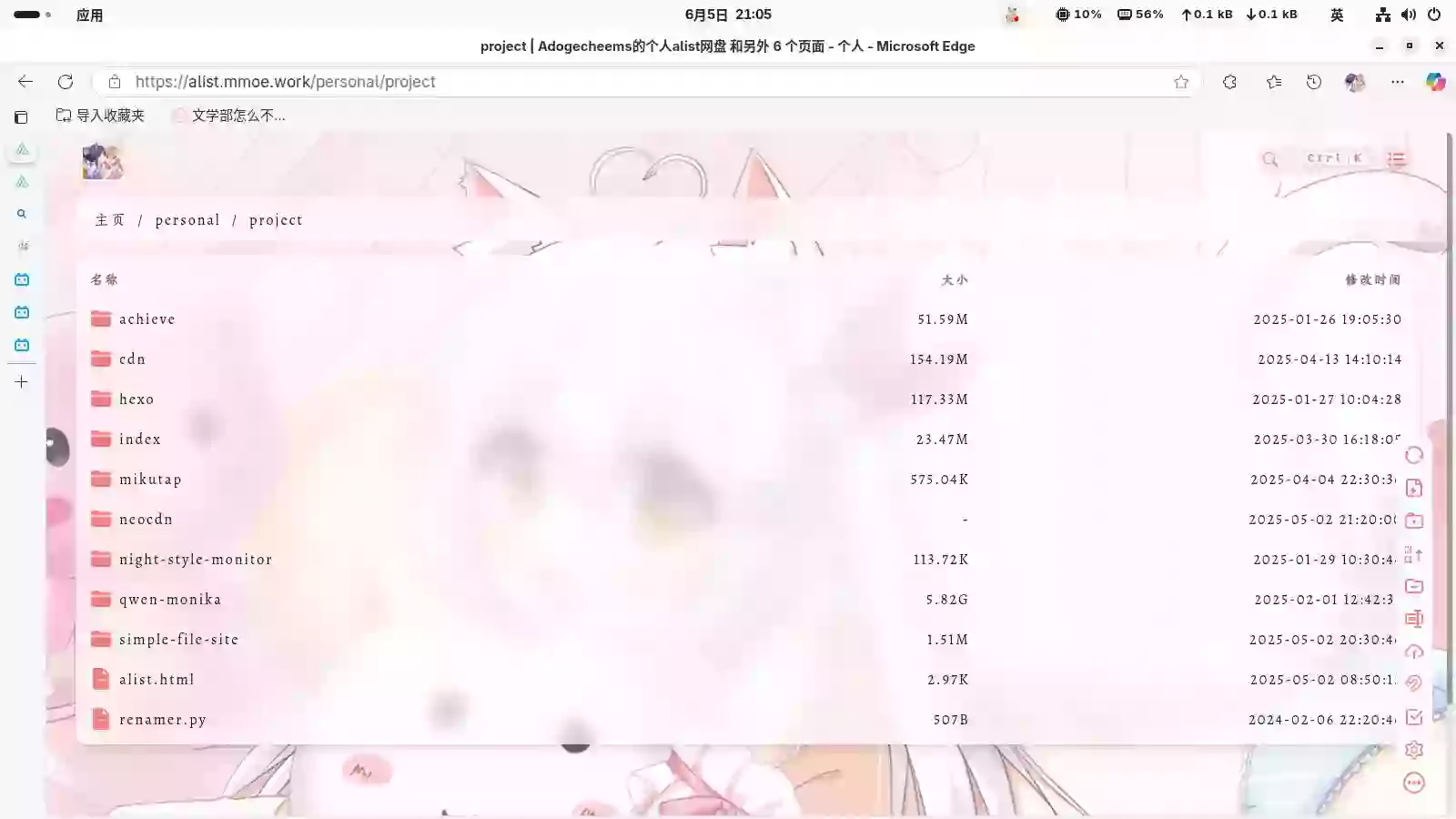
系统默认界面虽然简约清爽,但对希望打造独特风格、提升站点质感的站长而言,视觉表现仍略显单调。借助本篇教程,你无需复杂操作,即可快速实现以下美化效果:
全局字体优化:替换为阅读体验更佳的 “霞鹜文楷” 字体,让文字展示更舒适。
动态交互增强:添加看板娘互动效果与底部悬浮音乐播放器,提升站点趣味性。
实用功能扩展:集成 Valine 评论系统与不蒜子站点统计,轻松实现留言与访问统计。
视觉质感升级:支持日夜间模式自动切换背景,并为整体界面添加磨砂玻璃透明效果。
本次美化教程分为两个核心步骤:
第一部分:配置自定义头部代码
第二部分:配置自定义内容美化代码
第一部分:自定义头部美化代码
登录 OpenList 或 AList 管理后台,进入 设置 -> 全局 -> 自定义头部。
复制下方全局自定义头部代码
<!--Alist V3建议添加的,已经默认添加了,如果你的没有建议加上-->
<script src="https://polyfill.alicdn.com/v3/polyfill.min.js?features=String.prototype.replaceAll"></script>
<!--引入字体,全局字体使用-->
<link rel="stylesheet" href="https://npm.elemecdn.com/lxgw-wenkai-webfont@1.1.0/lxgwwenkai-regular.css" />
<!--评论系统使用的js-->
<script src="https://unpkg.com/valine/dist/Valine.min.js"></script>
<!--不蒜子计数器-->
<script async src="https://busuanzi.9420.ltd/js"></script>
<!-- Font6,自定义底部使用和看板娘使用的图标和字体文件-->
<link type="text/css" rel="stylesheet" href="https://npm.elemecdn.com/font6pro@6.3.0/css/fontawesome.min.css" media="all" />
<link href="https://npm.elemecdn.com/font6pro@6.3.0/css/all.min.css" rel="stylesheet" />
<!--音乐播放器所用的文件-->
<!-- require APlayer -->
<link rel="stylesheet" href="https://npm.elemecdn.com/aplayer@1.10.1/dist/APlayer.min.css" />
<script src="https://npm.elemecdn.com/aplayer@1.10.1/dist/APlayer.min.js"></script>
<!-- require MetingJS -->
<script src="https://npm.elemecdn.com/meting2@0.0.1/js/Meting.min.js"></script>
<style>
  /* 去除通知栏 右上角 X */
  .notify-render .hope-close-button {
    display: none;
  }
  /*去掉底部*/
  .footer {
    display: none !important;
  }
  /* 此选项两处CSS 在v3.31.0中已优化 滚动显示 和 右下角设置网格模式尺寸大小 */
  /* 文字超长自动换行 */
  /*.name-box .name {
    white-space: unset !important;
    overflow: unset !important;
    }*/
  /* 缩略图图片变大 代码中的160px 自己改 现在是注释状态若需要自行解除注释 */
  /*.obj-box > div {
    grid-template-columns: repeat(auto-fill, minmax(160px, 1fr))
    }
    .obj-box > div .item-thumbnail{
    height: 100px;
    }*/
  /*
    图片API用法点进去都会有食用说明的,API来自网络不保证实效性稳定性自己测试
    樱花:https://www.dmoe.cc
    夏沫:https://cdn.seovx.com
    搏天:https://api.btstu.cn/doc/sjbz.php
    姬长信:https://github.com/insoxin/API
    小歪:https://api.ixiaowai.cn/
    保罗:https://api.paugram.com
    墨天逸:https://api.mtyqx.cn
    岁月小筑:https://img.xjh.me
    东方Project:https://img.paulzzh.com
*/
  /*白天背景图*/
  .hope-ui-light {
    background-image: url("https://pic.rmb.bdstatic.com/bjh/7569b014a1abafd5481298763300ae1d.png") !important;
    background-repeat: no-repeat;
    background-size: cover;
    background-attachment: fixed;
    background-position-x: center;
  }
  /*夜间背景图*/
  .hope-ui-dark {
    background-image: url("https://pic.rmb.bdstatic.com/bjh/ebe942a9de49856f389c65f25a338335.png") !important;
    background-repeat: no-repeat;
    background-size: cover;
    background-attachment: fixed;
    background-position-x: center;
  }
  /*主列表白天模式透明*/
  .obj-box.hope-stack.hope-c-dhzjXW.hope-c-PJLV.hope-c-PJLV-igScBhH-css {
    background-color: rgba(255, 255, 255, 0.5) !important;
  }
  /*主列表夜间模式透明*/
  .obj-box.hope-stack.hope-c-dhzjXW.hope-c-PJLV.hope-c-PJLV-iigjoxS-css {
    background-color: rgb(0 0 0 / 50%) !important;
  }
  /*readme白天模式透明*/
  .hope-c-PJLV.hope-c-PJLV-ikSuVsl-css {
    background-color: rgba(255, 255, 255, 0.5) !important;
  }
  /*readme夜间模式透明*/
  .hope-c-PJLV.hope-c-PJLV-iiuDLME-css {
    background-color: rgb(0 0 0 / 50%) !important;
  }
  /*顶部右上角切换按钮透明*/
  .hope-ui-light .hope-c-ivMHWx-hZistB-cv.hope-icon-button {
    background-color: rgba(255, 255, 255, 0.5) !important;
  }
  .hope-ui-dark .hope-c-ivMHWx-hZistB-cv.hope-icon-button {
    background-color: rgb(0 0 0 / 50%) !important;
  }
  /*右下角侧边栏按钮透明 第一个是白天 第二个是夜间*/
  .hope-ui-light .hope-c-PJLV-ijgzmFG-css {
    background-color: rgba(255, 255, 255, 0.5) !important;
  }
  .hope-ui-dark .hope-c-PJLV-ijgzmFG-css {
    background-color: rgb(0 0 0 / 50%) !important;
  }
  /*白天模式代码块透明*/
  .hope-ui-light pre {
    background-color: rgba(255, 255, 255, 0.1) !important;
  }
  /*夜间模式代码块透明*/
  .hope-ui-dark pre {
    background-color: rgba(255, 255, 255, 0) !important;
  }
  /*左侧侧边栏目录*/
  /*白天模式*/
  .hope-ui-light .hope-c-PJLV-ieGWMbI-css {
    background: rgba(255, 255, 255, 0.5) !important;
  }
  /*夜间模式*/
  .hope-ui-dark .hope-c-PJLV-ieGWMbI-css {
    background-color: rgb(0 0 0 / 50%) !important;
  }
  /* 返回顶部 */
  .hope-c-PJLV-ihVEsOa-css {
    background: rgba(255, 255, 255, 0.5) !important;
  }
  .hope-ui-dark .hope-c-PJLV-ihVEsOa-css {
    background-color: rgb(0 0 0 / 50%) !important;
  }
  /*顶部*/
  #root > .header {
    background: rgba(255, 255, 255, 0);
  }
  /*导航条*/
  /*白天模式*/
  .hope-ui-light .body > .nav {
    background-color: rgba(255, 255, 255, 0.5);
    border-radius: var(--hope-radii-xl);
  }
  /*夜间模式*/
  .hope-ui-dark .body > .nav {
    background-color: rgb(0 0 0 / 50%);
    border-radius: var(--hope-radii-xl);
  }
  /*隐藏导航条遮罩*/
  .body > .nav::after {
    display: none;
  }
  /*底部CSS,.App .table这三个一起的*/
  dibu {
    border-top: 0px;
    position: absolute;
    bottom: 0;
    width: 100%;
    margin: 0px;
    padding: 0px;
  }
  .App {
    min-height: 85vh;
  }
  .table {
    margin: auto;
  }
  /*全局字体*/
  * {
    font-family: LXGW WenKai;
  }
  * {
    font-weight: bold;
  }
  body {
    font-family: LXGW WenKai;
  }
  /*以下为评论系统专用*/
  /*适配大小契合度*/
  .newValine {
    width: min(96%, 940px);
    flex-direction: column;
    row-gap: var(--hope-space-2);
    border-radius: var(--hope-radii-xl);
    padding: var(--hope-space-2);
    box-shadow: var(--hope-shadows-lg);
  }
  /*评论区 - 白天模式透明度*/
  .hope-ui-light .newValine {
    background-color: rgba(255,255, 255, 0.5) !important;
  }
  /*评论区 - 夜间模式透明度*/
  .hope-ui-dark .newValine {
    background-color: rgb(0 0 0 / 50%) !important;
  }
  /*输入栏里面跳舞的小人背景图,jsdelivr加载慢的可以自己替换或者删掉*/
  .vedit {
    background-image: url("https://cdn.jsdelivr.net/gh/anwen-anyi/imgAnwen/images/OuNiJiang.gif");
    background-size: contain;
    background-repeat: no-repeat;
    background-position: right bottom;
    transition: all 0.25s ease-in-out 0s;
  }
  textarea#comment-textarea:focus {
    background-position-y: 120px;
    transition: all 0.25s ease-in-out 0s;
  }
  /*渐变背景CSS*/
  #canvas-basic {
    position: fixed;
    display: block;
    width: 100%;
    height: 100%;
    top: 0;
    right: 0;
    bottom: 0;
    left: 0;
    z-index: -999;
  }
  /* 以下为音乐播放器额外配置 */
  /* 如果你想要音乐播放器不是很靠底部可以自己设置一下数值 0是靠最底部 */
  .aplayer .aplayer-body,
  .aplayer.aplayer-withlist {
    bottom: 0rem !important;
  }
  /*音乐播放器进一步进行隐藏*/
  /* 需要就加不需要就不用加 */
  .aplayer.aplayer-fixed.aplayer-narrow .aplayer-body {
    left: -66px !important;
  }
  .aplayer.aplayer-fixed.aplayer-narrow .aplayer-body:hover {
    left: 0 !important;
  }
</style>
第二部分:美化自定义内容代码
登录 OpenList 或 AList 管理后台,进入 设置 -> 全局 -> 自定义内容。
复制下方全局自定义内容代码
<!--延迟加载-->
<!--如果要写自定义内容建议都加到这个延迟加载的范围内-->
<div id="customize" style="display: none;">
    <div>
        <!--音乐播放器-->
        <meting-js fixed="true" autoplay="false" theme="#409EFF" list-folded="true" auto="QQ音乐或者网易云的链接"></meting-js>
        <!--评论模块还有下面的script也是-->
        <center>
            <div class="newValine" id="vcomments"></div>
        </center>
        <script>
            new Valine({
                visitor: true,
                el: '#vcomments',
                avatar: 'wavatar',
                appId: 'Your appId',
                appKey: 'Your appKey',
                placeholder: "有什么问题欢迎评论区留言~么么哒"
            })
        </script>
        <br />
        <center class="dibu">
            <div style=" line-height: 20px;font-size: 9pt;font-weight: bold;">
                <span>
                    "
                    <span style="color: rgb(13, 109, 252); font-weight: bold;" id="hitokoto">
                        <a href="#" id="hitokoto_text">
                            "人生最大的遗憾,就是在最无能为力的时候遇到一个想要保护一生的人."
                        </a>
                    </span> "
                </span>
                <p style="margin-left: 10rem;font-size: 8pt;">
                    <small>
                        —— Anwen's Cloud
                    </small>
                </p>
            </div>
            <div style="font-size: 13px; font-weight: bold;">
                <span class="nav-item">
                    <a class="nav-link" href="xxxxxxxxxx"
                        target="_blank">
                        <i class="fab fa-qq" style="color:#409EFF" aria-hidden="true">
                        </i>
                        QQ |
                    </a>
                </span>
                <span class="nav-item">
                    <a class="nav-link" href="mailto:xxxxx@foxmail.com" target="_blank">
                        <i class="fa-duotone fa-envelope-open" style="color:#409EFF" aria-hidden="true">
                        </i>
                        邮箱 |
                    </a>
</span>
                <span class="nav-item">
                    <a class="nav-link" href="xxxxxx" target="_blank">
                        <i class="fas fa-edit" style="color:#409EFF" aria-hidden="true">
                        </i>
                        博客 |
                    </a>
                </span>
                <span class="nav-item">
                    <a class="nav-link" href="xxxxxxxx" target="_blank">
                        <i class="fas fa-comment-lines" style="color:#409EFF;" aria-hidden="true">
                        </i>
                        留言 |
                    </a>
                </span>
                <span class="nav-item">
                    <a class="nav-link" href="xxxxxxx" target="_blank">
                        <i class="fa fa-cloud-download" style="color:#409EFF;" aria-hidden="true">
                        </i>
                        云盘 |
                    </a>
                </span>
                <!--后台入口-->
                <span class="nav-item">
                    <a class="nav-link" href="/@manage" target="_blank">
                        <i class="fa-solid fa-folder-gear" style="color:#409EFF;" aria-hidden="true">
                        </i>
                        管理 |
                    </a>
                </span>
                <!--版权,请尊重作者-->
                <span class="nav-item">
                    <a class="nav-link" href="https://github.com/Xhofe/alist" target="_blank">
                        <i class="fa-solid fa-copyright" style="color:#409EFF;" aria-hidden="true">
                        </i>
                        Alist
                    </a>
                </span>
                <br />
                <!--添加一个访问量-->
                <span>
                    本"<span style="color: rgb(13, 109, 252); font-weight: bold;"><a href="#">目录</a></span>"访问量 <span id="busuanzi_page_pv" style="color: rgb(13, 109, 252); font-weight: bold;"></span> 次 本站总访问量 <span id="busuanzi_site_pv" style="color: rgb(13, 109, 252); font-weight: bold;"></span>                次 本站总访客数 <span id="busuanzi_site_uv" style="color: rgb(13, 109, 252); font-weight: bold;"></span> 人
                </span>
                <br />
                <!--添加备案信息-->
                <span class="nav-item">
                    <a class="nav-link" href="https://beian.miit.gov.cn/#/Integrated/index" target="_blank">
                        <i class="fa-solid fa-shield-check" style="color:#409EFF;" aria-hidden="true">
                        </i>
                        冀 ICP备2222000777号
                    </a>
                </span>
            </div>
        </center>
        <br />
        <br />
    </div>
    <!--一言API-->
    <script src="https://v1.hitokoto.cn/?encode=js&select=%23hitokoto" defer></script>
<!--延迟加载范围到这里结束-->
</div>
<!--延迟加载配套使用JS-->
<script>
    let interval = setInterval(() => {
        if (document.querySelector(".footer")) {
            document.querySelector("#customize").style.display = "";
            clearInterval(interval);
        }
    }, 200);
</script>
<!-- 渐变背景初始化,如果要使用渐变背景把下面的那一行注释去掉即可-->
<!-- 下面的几行都是渐变的一套,自定义头部内还有一个关联的自定义CSS -->
<!--<canvas id="canvas-basic"></canvas> -->
<script src="https://npm.elemecdn.com/granim@2.0.0/dist/granim.min.js"></script>
<script>
var granimInstance = new Granim({
    element: '#canvas-basic',
    direction: 'left-right',
    isPausedWhenNotInView: true,
    states : {
        "default-state": {
            gradients: [
                ['#a18cd1', '#fbc2eb'],
                 ['#fff1eb', '#ace0f9'],
                 ['#d4fc79', '#96e6a1'],
                 ['#a1c4fd', '#c2e9fb'],
                 ['#a8edea', '#fed6e3'],
                 ['#9890e3', '#b1f4cf'],
                 ['#a1c4fd', '#c2e9fb'],
                 ['#fff1eb', '#ace0f9']
            ]
        }
    }
});
</script>
常见答疑(FAQ)
Q:页面背景图片加载迟缓如何处理?
A:项目默认背景素材依托公共免费图床资源存放,受服务器、跨域网速影响加载偏慢。可把原图保存至本地,上传部署到自身 OpenList 项目文件夹内,再修改页面引用地址,替换格式参考:https:// 自定义域名 /d/ 图片 /bg.png。
Q:内嵌音乐播放器无法正常展示?
A:优先核查页面 Body 区块代码,确认播放器嵌入标签完整无误,同时核对绑定的歌单编号合规可用,优先选用网易云歌单 ID 进行配置。
Q:OpenList 能否直接沿用 AList 的 CSS 样式命名?
A:OpenList 由 AList 二次迭代开发,主流核心样式类(.hope-ui-light、.obj-box 等)互相兼容通用。倘若程序升级后页面排版错乱,可打开浏览器开发者控制台,核验元素对应的 CSS 类名是否随版本改动。
还没有评论,来说两句吧...