
OpenList 界面美化代码分享 Alist网盘页面美化
本篇带来 OpenList 界面美化实操教程,也是 Alist&OpenList 美化专栏第二篇内容。截至文稿整理完成,OpenList 项目仍处在 Beta 测试阶段,项目上线时间短、圈内普及度偏低,相关使用文档、美化配置教程全网资源稀缺,本文大概率是全网首篇 OpenList 专项美化干货。在正式进入美化实操前,先来简单科普 OpenList 项目由来。
OpenList 是什么?
OpenList 是热门开源网盘聚合程序 Alist 商业化易主后,由原项目多名核心贡献者独立分叉开发的全新开源项目。因原版 Alist 整体转让给商业机构运营,不少开发成员选择出走,基于原有代码重构,打造出主打纯净开源的 OpenList。
自定义内容(核心科技)
<!-- v7 -->
<!-- 修正部分区域的透明 -->
<style>
    .hope-ui-light,
    .hope-ui-dark {
        --hope-colors-background: transparent;
    }
</style>
<script type="module">
    // v7
    // 提供用来监听代码控制的 url 变化的事件
    (() => {
        const wrapHistoryMethod = (type) => {
            const orig = history[type];
            return function (...args) {
                const rv = orig.apply(this, args);
                const event = new CustomEvent(type, { detail: args });
                window.dispatchEvent(event);
                return rv;
            };
        };
        history.pushState = wrapHistoryMethod('pushState');
        history.replaceState = wrapHistoryMethod('replaceState');
    })();
    class Beautifier {
        /**
            * Beautifier 类用于美化页面背景色
            *
            * 其提供了3个方法:
            * - observe: 开始监听页面变化并美化背景色
            * - disconnect: 停止监听页面变化
            * - undo: 恢复页面背景色到默认状态
            *
            * 可以通过window.beautifier访问实例对象
            *
         */
        static ignoredSelectors = [
        '.hope-tooltip', // 提示小标签及其装饰
        '.hope-tooltip__arrow',
        '.hope-checkbox__control',// 复选框
        '.hope-modal__overlay', // 模态框遮罩
        '.hope-drawer__overlay', // 抽屉遮罩
        '.hope-select__option', // 下拉选项
        '.monaco-editor, .monaco-editor *', // 代码编辑器
        '.art-video-player, .art-video-player *', // 视频播放器
        'button:not(.hope-menu__trigger)', // 除目录外按钮
        'svg' // SVG 图标
    ];
        static getSelector(mainSelector) {
            return `${mainSelector} :not(${Beautifier.ignoredSelectors.join('):not(')})`;
        }
        static lightSelector = Beautifier.getSelector('.hope-ui-light');
        static darkSelector = Beautifier.getSelector('.hope-ui-dark');
        static lightBgColor = 'rgba(255, 255, 255, 0.8)';
        static darkBgColor = 'rgb(32, 36, 37)';
        static specificPrefix = 'rgba(132, 133, 141,';
        constructor() {
            this.observer = null;
        }
        /**
         * @param {'light'|'dark'} theme
         */
        #rewriteStyle(theme) {
            let selector = theme === 'light' ? Beautifier.lightSelector : Beautifier.darkSelector;
            let bgColor = theme === 'light' ? Beautifier.lightBgColor : Beautifier.darkBgColor;
            document.querySelectorAll(selector).forEach(element => {
                const computedStyle = getComputedStyle(element);
                if (computedStyle.backgroundColor !== 'rgba(0, 0, 0, 0)' &&
                    !computedStyle.backgroundColor.startsWith(Beautifier.specificPrefix)) {
                    element.style.backgroundColor = bgColor;
                    element.setAttribute('data-beautified', 'true');
                }
            });
        }
        #beautify() {
            if (!location.pathname.startsWith('/@manage') && !location.pathname.startsWith('/@login')) {
                this.#rewriteStyle('light');
                this.#rewriteStyle('dark');
            }
        }
        observe() {
            this.observer = new MutationObserver(this.#beautify.bind(this));
            this.observer.observe(document.body, {
                childList: true,
                subtree: true
            });
            this.#beautify();
        }
        disconnect() {
            if (this.observer) {
                this.observer.disconnect();
            }
        }
        undo() {
            this.disconnect();
            document.body.querySelectorAll('[data-beautified]').forEach(element => {
                element.style.backgroundColor = '';
                element.removeAttribute('data-beautified');
            });
        }
    }
    const beautifier = new Beautifier();
    window.beautifier = beautifier;
    beautifier.observe();
    // 一个愚蠢到有点无敌的修复机制,不过工作良好
    (() => {
        function fixLogin(pathname) {
            if (pathname.startsWith('/@login')) {
                beautifier.undo();
            }
            else {
                beautifier.disconnect();
                beautifier.observe();
            }
        }
        ['popstate', 'pushState', 'replaceState'].forEach(eventType => {
            addEventListener(eventType, () => {
                fixLogin(location.pathname);
            });
        });
    })();
</script>
自定义头部(想用就用)
<!-- v4 -->
<!-- 引入自定义字体 -->
<link rel="stylesheet" href="https://s4.zstatic.net/ajax/libs/lxgw-wenkai-webfont/1.7.0/lxgwwenkai-regular.min.css">
<style>
    /* 移除原生视频控件 */
    video::-webkit-media-controls {
        display: none;
    }
    /* 设置背景图片样式 */
    body {
        background-repeat: no-repeat;
        background-size: cover;
        background-attachment: fixed;
        background-position: center;
    }
    /* 在此处的url()里修改背景图片地址 */
    /* 加了个深色遮罩,爱护你的眼睛 */
    body.hope-ui-dark {
        background-color: rgb(32, 36, 37);
        background-image: linear-gradient(rgba(32, 36, 37, 0.7), rgba(32, 36, 37, 0.7)), url('https://cdn.mmoe.work/img/miku.webp');
    }
    /* 在此处的url()里修改背景图片地址 */
    body.hope-ui-light {
        background-image: url('https://cdn.mmoe.work/img/miku.webp');
    }
    /* 统一站点公告的样式 */
    .hope-ui-light .hope-c-PJLV-ikJQsXT-css {
        background: rgba(255, 255, 255, 0.8) !important;
        backdrop-filter: blur(0) !important;
    }
    .hope-ui-dark .hope-c-PJLV-ikJQsXT-css {
        background: rgb(32, 36, 37) !important;
        backdrop-filter: blur(0) !important;
    }
    /* 自定义字体 */
    * {
        font-family: "LXGW WenKai", sans-serif;
    }
</style>
<!-- 看板娘 -->
<script src="https://l2d.mmoe.work/dist/autoload.js" async></script>
<script
    src="https://s4.zstatic.net/ajax/libs/js-polyfills/0.1.43/polyfill.min.js?features=String.prototype.replaceAll"></script>
通过cdn引入
<script type="module" src="https://fastly.jsdelivr.net/gh/adogecheems/alist-beautification@latest/src/beautifier.js"></script>
美化后的效果:
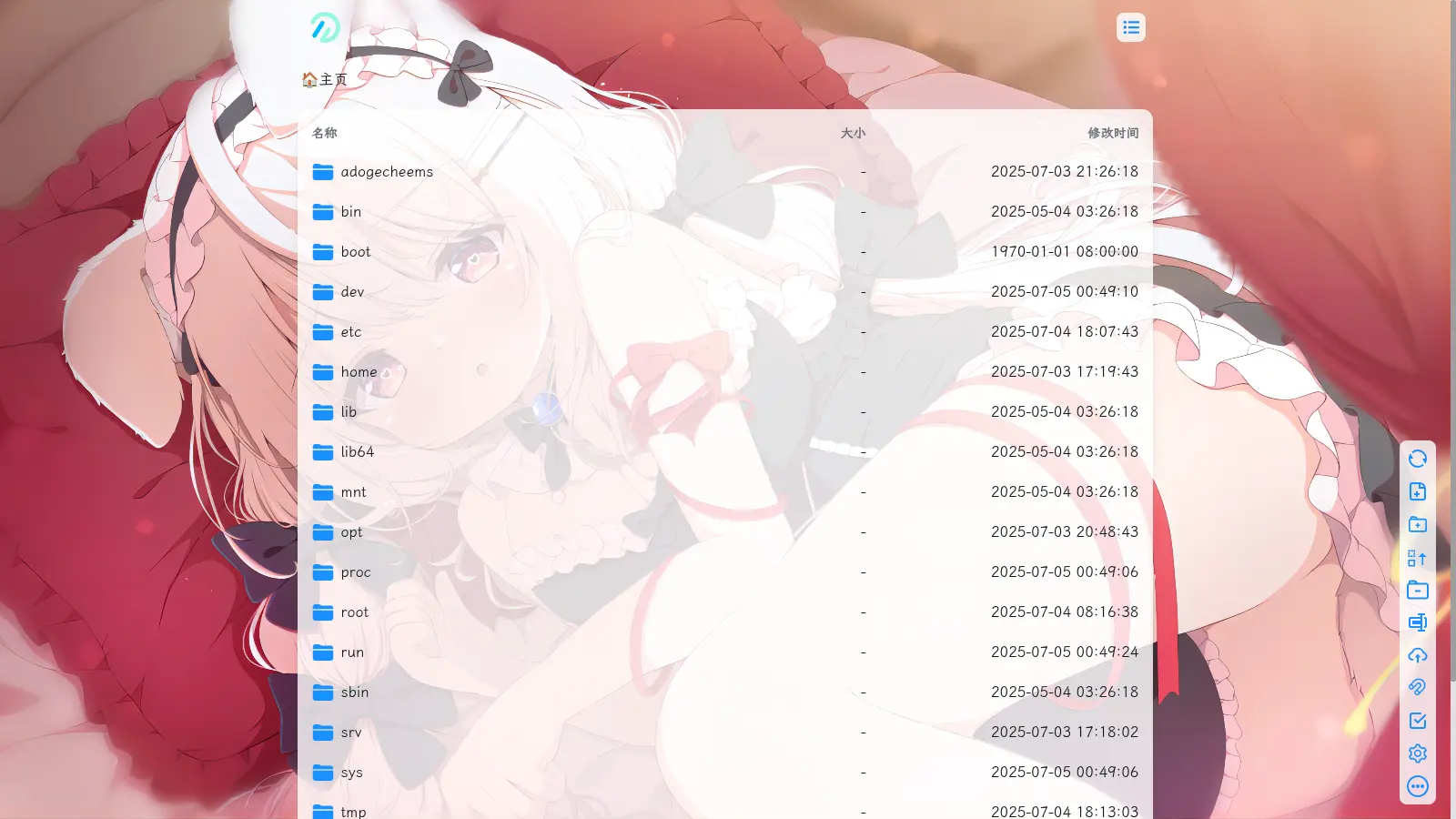
客观来说,现阶段 OpenList 和初代 Alist 在前端表现上几乎看不出差别,原先适配 Alist 的各类美化样式代码,大多能够直接复用在 OpenList 程序中。
不少朋友会疑惑:既然旧代码可以直接套用,为何还要单独撰写一篇 OpenList 美化教程?其实初衷并非蹭项目流量,核心在于本文分享的美化方案源自之前分享的长效 Alist 美化思路,依托 DOM 动态监听 Observe 机制开发,兼容性与通用性更强,后续 OpenList 迭代升级时维护成本更低。
用过常规 Alist 美化脚本的用户基本都踩过同款坑:程序版本小幅更新,页面 CSS 类名变动,之前的美化布局就会错乱变形。而这套基于动态监听的美化方案,不受前端类名修改影响,即便软件历经多次版本迭代,美化效果依旧稳定可用。
正因如此,在 OpenList 新项目问世之后,我特意重新整理成文,希望这套高适配美化方法能够成为 OpenList 圈子里的主流美化选择。
还没有评论,来说两句吧...